Workspace · 5 min read
Review the draft
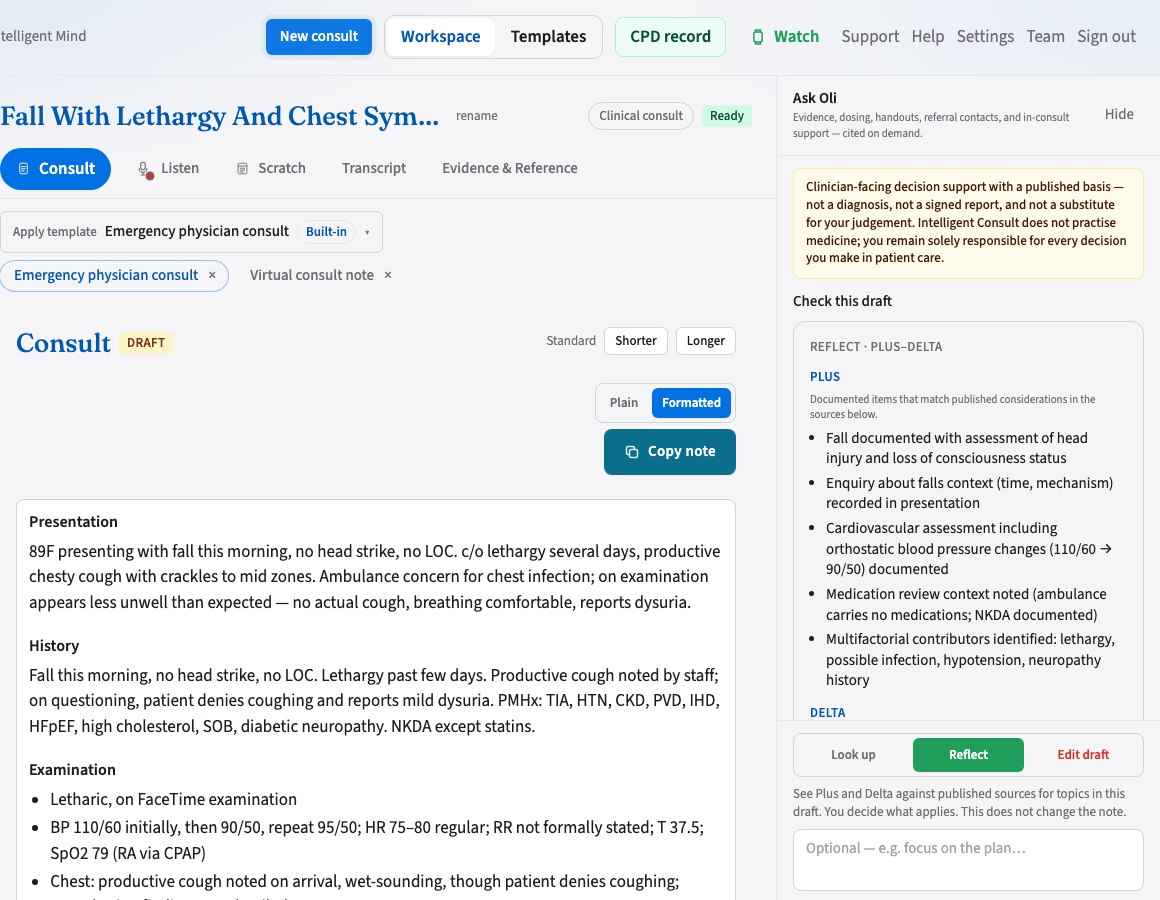
Consult tab
The Consult tab is the note. Listen & Dictate is recording. Scratch is your rough pad during the visit. Transcript is the words as captured. Evidence & Reference is published lookup — it does not write into the note.
Edit and chat-revise
Edit a section directly, or use Edit draft with a plain-English instruction (for example, “expand the plan”). OLI produces a new draft version. If the instruction is ambiguous, you may get one clarifying question first.
Copy note
Copy note puts the draft on the clipboard for the clinical system you already use.
- Formatted — bold headings for Word and most EMRs
- Plain — FirstNet-style plain text with hyphen bullets
On a referral or patient letter, add this letter’s patient details (name and date of birth) before copy or Open / Save as PDF. The PDF is for you to attach from your own mail app. Intelligent Consult does not send the letter. Practice letterhead is set by an organisation admin; your credentials are in Settings. Not a signed certificate.
Length
Shorter and Longer rewrite the same template sections at a different density. Your last choice is remembered. This is not a clinical suggestion — it is how much prose you want.
Finalise
When every section is yours, Finalise. Until then it remains a draft. Chat-revise stops on a finalised note (you can reopen if your workflow allows). Prefer desktop; if you cannot install the app, the browser is the computer. Phone is for a glance.